


What Is the Glovebox Insurance App?
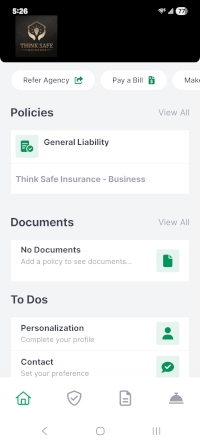
The Glovebox insurance app is a simple way to keep all of your insurance information in one place. Instead of logging into multiple carrier websites or digging through old emails, you can view your policies, ID cards, and documents from a single app on your phone or browser.
For Florida homeowners and drivers, this is especially valuable. It’s common here to have your home insurance with one company, auto with another, flood with a third — and maybe a separate wind policy on top of that. Glovebox brings everything together so you can actually see and manage your coverage without the hassle.
You can access Glovebox on iPhone, Android, or through your browser at my.gloveboxapp.com. Once set up, it becomes your go-to hub for everything insurance-related.
Why Think Safe Insurance Uses Glovebox
At Think Safe Insurance, we work with multiple carriers to help you find the right coverage for your situation. That flexibility matters in Florida, where the insurance market is constantly changing and your policies are often spread across different companies.
That’s exactly why we use Glovebox.
In Florida, having digital access to your policy information isn’t just convenient — it’s essential during storm season. If you need to evacuate ahead of a hurricane, you shouldn’t be hunting through paper folders or trying to remember which carrier handles your flood claim. Your policy numbers, contact info, and documents should be in your pocket before you pull out of the driveway.
Glovebox makes that possible. One login. Everything there.
Not every agency offers this. It’s one of the ways we make things simpler for our clients.
What You Can Do Inside the App
Once you’re set up, everything is organized in a way that actually makes sense. Here’s what you can do:
- View all your policies in one place
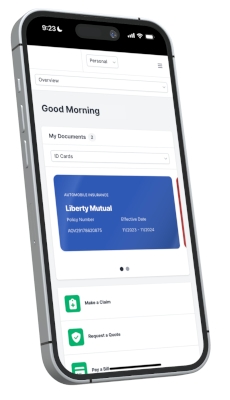
- Access insurance ID cards instantly
- Download important documents when you need them
- Click directly to your carrier’s payment or claims portal
- Message the Think Safe Insurance team directly
- Share referrals with friends and family
If you’ve ever been asked for your insurance card at the worst possible moment, you already know how valuable this is. No digging through your glove compartment or email inbox — it’s right there.
How to Set Up Your Glovebox Account
Getting started is quick. Here’s exactly how:
- Check your inbox for an email from Think Safe Insurance with your Glovebox setup link. (Check your spam folder if you don’t see it.)
- Click the link, or go directly to: https://my.gloveboxapp.com?agencyId=4092
- Enter your email or phone number and receive a secure PIN to verify your account.
- Click “Activate Account” once verified.
- Download the app from the App Store (iPhone) or Google Play (Android), or continue in the browser.
- Log in — your policies, ID cards, and documents should already be available.
- If you have Progressive or American Modern policies, activate Policy Monitoring for enhanced features.
Questions? Call us at 813-425-1626 and we’ll walk you through it.
Which Carriers Work with Glovebox?
Glovebox works across multiple insurance carriers, which is exactly what makes it useful for Florida clients who often have policies spread across several companies.
Carriers like Progressive and American Modern offer enhanced features through Glovebox, including policy monitoring for added visibility into your coverage.
For some Florida-specific carriers — including smaller state-market providers — automatic syncing may not be available. In those cases, you can manually upload your Declarations Page so all your policies still live in one place. This is especially helpful for keeping your flood and windstorm coverage organized alongside your home and auto policies, since those are often billed and managed separately here.
Glovebox vs. Managing Insurance the Old Way
Let’s be honest — the old way isn’t great. You log into one carrier for your auto policy. Another for home insurance. Maybe a third for flood. And when you need something quickly, you’re searching through emails or making phone calls.
With Glovebox:
- Open one app
- See all your policies
- Grab your ID card in seconds
- Click directly to make a payment or start a claim
Faster, simpler, and actually useful in real life — especially when a storm is heading your way.

Ready to Make Your Coverage Easier to Manage?
Think Safe Insurance is an independent agency based in Brandon, FL, serving clients across the entire state. We work with multiple carriers to find you the right fit — whether that’s home, auto, flood, wind, or umbrella coverage.
If you’re looking for better coverage, better organization, and access to tools like Glovebox, we’d be happy to help.
Or call us at 813-425-1626.
Frequently Asked Questions About the Glovebox App
What is the Glovebox insurance app?
Glovebox is a mobile and web-based app that lets you view and manage all your insurance policies in one place. It provides access to documents, ID cards, and links to carrier services — designed to simplify how you interact with your insurance.
Is Glovebox free for Think Safe Insurance clients?
Yes, completely free. No additional fees to use the app or access your policy information. It’s included as part of your experience with our agency.
What insurance carriers are compatible with Glovebox?
Glovebox works with multiple carriers. Some, like Progressive and American Modern, offer enhanced features including policy monitoring. For carriers without a direct sync, you can manually upload your Declarations Page to keep everything in one place.
Does this work for my Flood insurance?
Yes. Even if your specific flood carrier doesn’t have a direct sync, you can manually upload your Declarations Page so your flood, home, and auto information are all together in one app. This is especially useful in Florida, where flood policies are often managed separately through the NFIP or private carriers.
Can I use Glovebox if I have policies from multiple companies?
Yes — that’s one of the biggest benefits. Many Florida clients have policies with several different carriers. Glovebox brings them together so you manage everything from one app.
How do I get my insurance ID card through Glovebox?
Once your account is set up, your ID cards are available inside the app. You can view, download, or show them directly from your phone — no digging through emails or your glove compartment.
Is Glovebox secure?
Yes. Glovebox uses secure PIN authentication. Your information is protected and only accessible through your verified account.
Do I need the Glovebox app to manage my Think Safe Insurance policies?
No — you can still contact us or work directly with your carriers. But most clients prefer Glovebox once they get set up because it’s faster and keeps everything organized.
What’s the difference between Glovebox and logging in to my carrier directly?
Your carrier portal only shows one policy at a time. Glovebox shows all your policies together, with quick access to documents and direct links to payment or claims — all in one place.
Learn more about Florida homeowners insurance policies or request a free quote today.
Last Reviewed: March 2026